Android SDK documentation
Introduction
The Android SDK is a set of Android modules that can be integrated in Android projects.
Here is a brief presentation of the modules :
-
Error Manager : used by all modules to handle errors. You need to implement it first.
-
Core : this module is required to use almost all other modules. To initialize it, you need a purchase UUID (license) provided by BeNomad.
-
Mapping : provides interactive maps that can be customized with styles and layers.
-
MapServices : allows download or import additional map data. This module can only be used if dedicated data is configured on BeNomad servers.
-
Geocoder : provides online geocoding functionalities and offline reversed geocoding functionalities.
-
Vehicle Manager : provides classes required for using both Planner and Navigation modules. It can also fetch vehicles profiles from BeNomad servers, for example to get electric vehicle profiles that can be used to optimize routes with the Planner (BeMap credentials required and provided by BeNomad).
-
Traffic Manager : provides realtime traffic information.
-
Planner : provides route calculation functionalities. It also provides EV features which requires to get EV profiles using the Vehicle Manager.
-
GPS Manager : used to define GPS sources for the Navigation module.
-
Navigation : provides tracking and guidance functionalities with EV features using optimized routes computed by the Planner module.
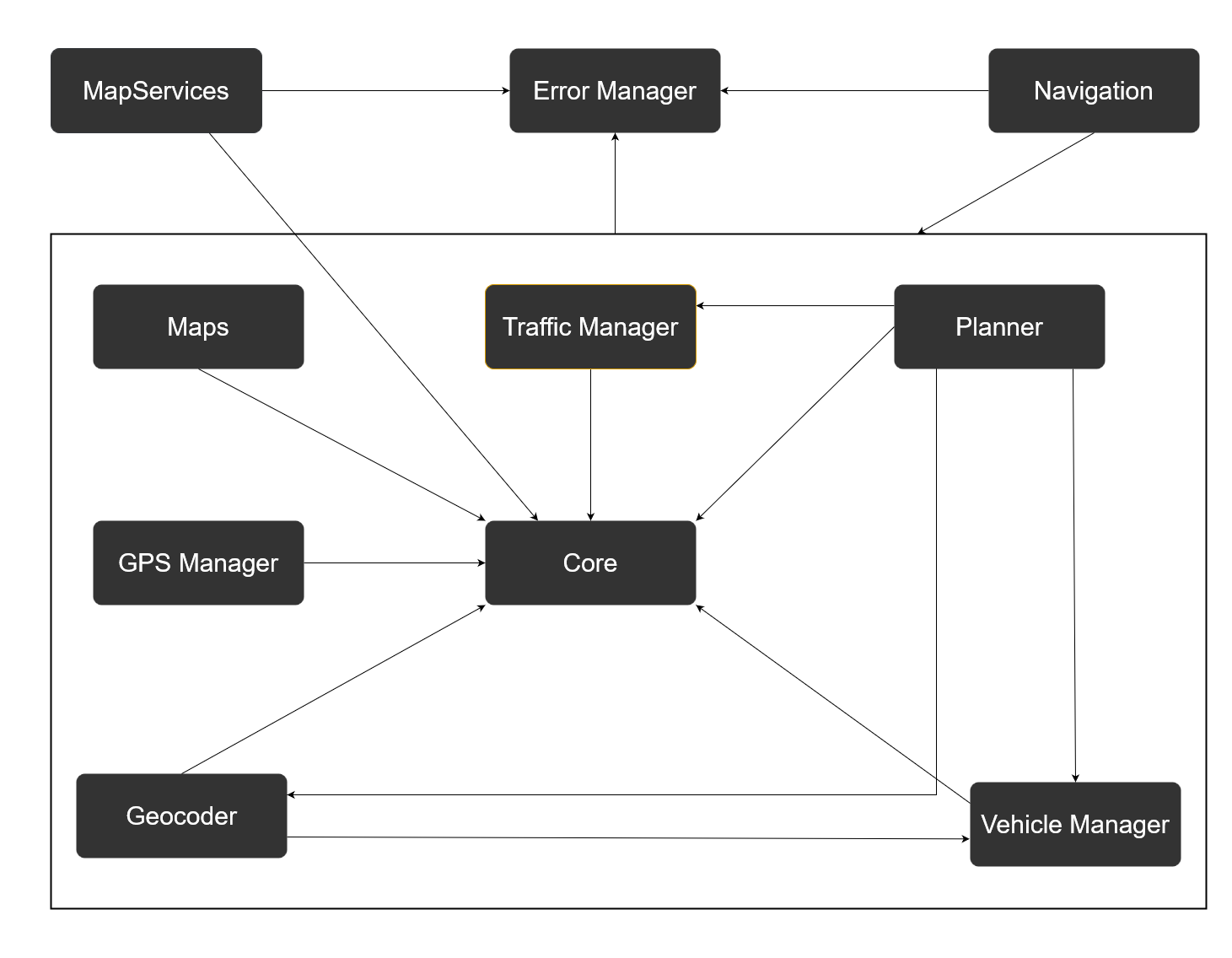
Representation of modules' dependencies :
Integration
Modules are available as Maven dependencies. To integrate them, you need a Nexus url and credentials provided by BeNomad. You can contact us at msdk@benomad.com for more information.
Create variables in local.properties
In the local.properties file of your Android project, define these variables :
NEXUS_URL=the-provided-url
NEXUS_USERNAME=the-provided-username
NEXUS_PASSWORD=the-provided-passwordGet properties from local.properties
In your settings.gradle file, add the following before the dependencyResolutionManagement statement :
Properties properties = new Properties()
if (file('local.properties').canRead()) {
    properties.load(file("local.properties").newDataInputStream())
}Add maven repository
In your settings.gradle file, in "repositories", in "dependencyResolutionManagement" add the maven repo information.
It should look something like this :
dependencyResolutionManagement {
    repositoriesMode.set(RepositoriesMode.FAIL_ON_PROJECT_REPOS)
    repositories {
        google()
        mavenCentral()
        maven {
            url properties.getProperty('NEXUS_URL')
            allowInsecureProtocol = true
            credentials {
                username properties.getProperty('NEXUS_USERNAME')
                password properties.getProperty('NEXUS_PASSWORD')
            }
        }
    }
}Add dependencies in build.gradle
BeNomad's Android SDK is divided in several libraries, here are all the artifact ids :
dependencies {
    def msdk_version = 'x.x.x'

    // Mandatory dependencies :
    implementation("com.benomad.sdk:error-manager:$msdk_version")
    implementation("com.benomad.sdk:core:$msdk_version")

    //All other dependencies, choose those required for your project
    implementation("com.benomad.sdk:permissions-manager:$msdk_version")
    implementation("com.benomad.sdk:maps:$msdk_version")
    implementation("com.benomad.sdk:mapservices:$msdk_version")
    implementation("com.benomad.sdk:geocoder:$msdk_version")
    implementation("com.benomad.sdk:gps-manager:$msdk_version")
    implementation("com.benomad.sdk:vehicle-manager:$msdk_version")
    implementation("com.benomad.sdk:traffic-manager:$msdk_version")
    implementation("com.benomad.sdk:planner:$msdk_version")
    implementation("com.benomad.sdk:navigation:$msdk_version")
}All modules:
This module is required to use almost all other modules. It handles the BeNomad license validation, the download/deployment of the maps and other required resources. To use it, you need a valid purchase UUID key provided by BeNomad. This unique key will determine which maps (HERE/TomTom/OpenStreetMap..etc.) have to be downloaded and how many installations are allowed. It also define the maps deployment mode (full maps or hybrid maps) and the map coverage.
This module provides online geocoding functionalities (searching for addresses by text with optional filters) using the BeMap API (data provider is HERE). It also provides offline reversed geocoding functionalities (converting location to an address) using local map data.
This module simplifies the process of requesting GPS location updates in an Android application and is required to use the Navigation module. It allows users to define multiple GPS sources (for example, the built-in GPS is a source, and a GPS simulation file is another source).
This module allows to implement map services to download or import additional map data.
Provides interactive maps as Android views. Maps depend on data that must be deployed using the Core module. The cartographic provider used for map data is defined with the UUID (license provided by BeNomad) used to initialize the Core. You can use multiple maps in an application and apply a different style for each one. Users can interact with the map through gestures (tap, double tap, long press, pan, pinch, rotate, tilt). Maps support dynamic layers to add points, lines, polylines, rectangles, ellipses, polygones, corridors...
This module offers real-time tracking and guidance features for both gas vehicles and electric vehicles. You need to provide a GPS source using the GPS Manager module to initialize the navigation engine.
This module simplifies the process for requesting permissions in an Android application. The default required permissions are those required for the BeNomad SDK. You can also set other permissions required for your application.
This module allows to plan and compute routes. You can then use the result to draw a route on a MapView using the Mapping module, and use it in the Navigation module to start a guidance session. It supports simple route calculation to one point to the other(s), via-points, alternative routes (only without via-points), consideration for route options, consumption calculation, optimization for electric vehicles... and more.
This module provides realtime traffic information.
This module gets vehicle profiles from BeNomad servers (BeMap credentials required) and uses a Room Database for handling data persistence. It also provides model classes required for both Planner and Navigation modules.